
“I’ll read this paper later,” I thought to myself before adding another tab to my overflowing internet browser.
Of course, I didn’t read it later.
This was the first year of my PhD, and that meant reading…a lot of reading.
For many hours, I read papers, determined to master the literature in my field, but the more I read, the more I felt like I was falling behind.
“How to find research papers quickly?” has been a never-ending question for me.
Because my workflow was so unorganized, I missed out on reading many important papers. This was a tipping point. The quality of the coming years would depend on how well I could keep up with the literature.
What I needed, I realized, was a well-thought-out system, not just good intentions. A system to track newly published papers, to organize what I’d already read, and to actually find things again when I needed them.
This is that system, evolved and shaped over the years in a way that made my PhD life so much easier.
The workflow for finding research papers really quickly
- Get 3–5 seed papers (ask your supervisor + find 1–2 review papers).
- Pull keywords + key authors from those seeds.
- Search in Google Scholar + one database (e.g., Scopus) using those keywords/authors.
- Expand using citation mapping tools (Connected Papers / ResearchRabbit / Litmaps / Inciteful).
- Set alerts (Google Scholar alerts + database alerts + RSS) so new papers automatically come to you.
What you’ll do in 15 minutes
- Find 5–10 seed papers
- Expand to 30–80 relevant papers using citation networks
- Set up alerts (RSS, etc.), so you stay current with ~5 minutes/day scanning
The best of
- The best way to find seed papers: Ask your supervisor, Review papers
- The best AI tool for finding research papers: Elicit
- Best research database for finding papers: Beginners – SCOPUS, Experienced researchers – Google Scholar
Pick your situation (so you can skip to the right part)
Finding ‘seed’ papers
Get recommendations from your supervisor
This is, by far, the best starting point for finding research papers quickly: ask the person who knows the field best.
You may have already received a folder of information from your supervisor on your thesis topic. If you’re working on a funded project, your supervisor has probably been working on the proposal before you were even hired. My supervisor, for example, keeps a folder named “Literature” for each project that contains all the important papers you’d need to complete it.
What I did was look at these seed papers first, then expand outward by following their references.
Asking your supervisor is one of the most straightforward ways to get started. Even if your supervisor hasn’t put together a folder like that, you can still ask for recommendations. A good couple of papers is more than enough to build momentum.
Use review papers
A review paper on your topic is a great starting point for finding good references and getting a broad overview of your research area.
In other words, review articles give you a solid foundation to build from.
After reading the review paper, you can dive into the references cited there. If you find a highly relevant review paper for your research, you’re reading a much more comprehensive summary of the topic than you’d get from reading ten individual research papers on the same subject.
Use academic textbooks the right way
If you’re new to a particular research area, it’s best to start by reading textbooks to understand the topic better.
Sometimes, textbooks don’t have the depth you’re looking for. This is especially true at the PhD level, because most textbooks are designed for undergraduate courses. But still, they can give you the basic concepts you need to read research papers.
Another valuable thing about textbooks is that they’re packed with other references, most of the time other research papers. So starting from a textbook, you can slowly work your way to research papers that closely align with your research, papers you wouldn’t have found otherwise.
But it’s important to keep in mind that textbooks aren’t meant to be read from cover to cover, which is something I used to do in the first year of my PhD. The best way to use a textbook is to look at the table of contents and then jump to the sections that matter most for your work.
Look for technical reports and theses
Research papers are obviously a good start, but it’s best not to limit yourself to research papers when looking for references.
A technical report or code documentation on the topic of interest can be surprisingly rich in citations, as well as practical information.
There’s nothing that compares to a PhD thesis when it comes to the depth and extent of analytical work. When you find a relevant thesis, look at which references students have cited on your topic. This opens doors to a gold mine of papers that you can dig through for days on end.
This comes in handy especially when you’re writing a report or a dissertation. If you find a relevant thesis for your literature review, you’ll have extensive information about the research topic in one place, saving you a ton of time.
Use standard research databases
SCOPUS
Scopus has strong searching capabilities and publishes metrics that can measure the relative importance of papers in their fields. But it can take up to 2 years before an article is included in Scopus.
It’s feature-rich for sorting and filtering, so you won’t feel overwhelmed when searching. If you’re just starting your research, Scopus might be an excellent option for finding research papers.
It’s important to note that indexing speed can vary by journal and workflow. Scopus coverage also depends on whether the journal is included in Scopus. Here’s Elsevier’s support page to verify this.
ResearchGate
I’ve been a big fan of ResearchGate from day one for many reasons.
- You can follow researchers in your field and keep up with their work.
- You can stay up to date with their research projects.
- And you can comment on publications, ask questions, and send direct messages to interact with others.
As most of the comments on ResearchGate come from experts in their respective fields, the Q&A section is a great resource for finding the right paper for your research.
Google Scholar
The best for last.
Google Scholar is like an abacus in a world of calculators. It’s the simplest tool on the list, yet somehow the most reliable and efficient.
Even with all the fancy tools available nowadays, including AI, in my experience, Google Scholar helps find the one, the most relevant paper, in the least amount of time.
But it only works if you know what you’re looking for, that is, if you know the precise keywords to put in so it gets you to the exact kind of paper you need.
So if you’re just starting your research and aren’t sure what keywords to search for, Google Scholar might not be your first choice. In my experience, the more I was exposed to my field of research, the more I leaned toward Google Scholar for this reason.
Use literature mapping tools
The conventional mapping tools
ResearchRabbit, Inciteful, Litmaps, and Connected Papers are literature mapping tools you can use to dig deeper into a topic. They let you see which papers are the most groundbreaking in a given field based on their citation networks.
This might not be very helpful if you’re doing research in a relatively new area. Finding relevant research papers in such cases can be more challenging. In this case, checking research databases is the better option.
The most comprehensive databases are:
AI-assisted research paper finding
Now, with the rise of AI, finding research papers has gotten much easier.
But in my experience, it’s best to be careful with trusting what AI tells you about the right paper. More often than not, the papers you’re looking for aren’t open source. In that case, AI can only read the abstract of the paper, which doesn’t contain the exact information you’re looking for.
The outcome of this limitation is AI giving you a good paper that’s relevant to what you asked for while leaving behind the right paper that actually answers your question.
Having said that, there are two things to be optimistic about when using AI for finding research papers. One, it finds papers fast from different places that no other tool can even remotely compete with. Second, the accuracy and capability of AI are exponentially increasing, so the gap between what it can do now and what it’ll do soon keeps shrinking.
But this doesn’t mean you can ask anything and hope to get the best outcome. The key to finding the right paper still depends largely on the quality of the prompt that we give it.
Here are some AI tools specifically designed for finding research papers:
Setting alerts
RSS
An RSS (Really Simple Syndication) feed, as the name implies, is a straightforward but powerful solution, which I came to realize much later in my PhD.
You can find RSS feeds for nearly every major journal and preprint server on their home pages. Just look for the orange icon. Even though people say RSS is dead, nearly every major publishing website has an ongoing, frequently updated RSS feed.
But RSS isn’t limited to journal articles. They give you access to science news, conference updates, and lab announcements, so staying current is effortless with RSS.
In the morning, I dedicate five minutes to scanning my feed. For most papers, I just glance at the title and scroll past. Whenever I come across something interesting, I add it to my Read Later folder. Instead of storing papers in an unsecured location, my papers are more secure, and it’s much easier for me to look at that folder later on.
There are many RSS readers to choose from, and they basically do the same thing. There’s always a free plan that’s pretty much all you need for staying current with an academic journal you’re interested in or any other academic news.
The ones that are most appealing to me are Feeder and Inoreader, which are both intuitive and beginner-friendly.
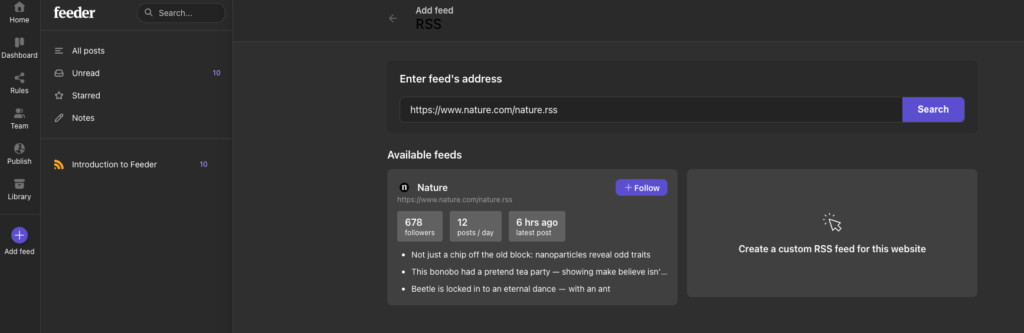
Adding an RSS feed is pretty straightforward.
Nature.com journal page → click “RSS” (or copy the RSS feed URL) → open Feeder → “+ Add Feed” → paste the URL → Follow/Subscribe.
Read more about RSS here:
Other ways to set alerts
- Citation alerts on the seed papers (Google Scholar, Scopus, Web of Science): this is one of the most convenient ways to find the next steps in the research you’re interested in.
- Preprint server email digests (arXiv, bioRxiv, ChemRxiv): best for keeping track of the early developments of the research fields, before journal publication.
FAQ
How do I find the most important papers on a topic fast?
Start with one high-quality seed (a recent review paper or a paper your supervisor recommends), then expand using citations: read the papers it cites (backward search) and the papers that cite it (forward search).
How do I find papers when I don’t know the right keywords?
First, use a review paper or a textbook section to learn the standard terms. These are the seeds discussed in this blog post.
Then, gather 5 to 10 papers that are relevant to your research topic.
Then, use a research-specific search engine or a journal (Nature, Science, or search engines like Google Scholar) to expand your search from those seed papers.
What’s the best way to keep up with new papers weekly?
Set up alerts so new papers arrive automatically in your inbox: (1) Google Scholar alerts for the research topic you’re interested in, (2) newsletters from scientific journals, and (3) RSS feeds for key journals or preprint servers. Then do one short scan at a fixed time each week (or 5 minutes each morning).
How do I find papers that challenge a popular claim?
Use forward citation searching and look specifically for: replication attempts, comment/reply articles, critiques, null results, and papers using different methods that test the same claim. Citation networks help you see debates and branches quickly.
How can I access papers if I’m paywalled?
Try these in order: (1) look for an open version via Google Scholar (often a PDF appears on the right), (2) check institutional repositories or author webpages, (3) request the paper through your library (interlibrary loan), and (4) email the authors and ask for a copy.
More often than not, your university library has access to any research paper you come across but can’t access directly. So if a paper is behind a paywall, just asking the help desk in your university library is usually enough to get it.
Is Google Scholar enough?
Out of all the fancy tools available today, including AI, if you want to find the right paper really quickly, the best way to do it is still using Google Scholar.
But there are caveats to this. For instance, if you’re not very familiar with your research area yet and don’t know the right keywords to search for, Google Scholar is definitely not the best choice.
But as you get familiar with your research over the years, the efficiency of Google Scholar definitely grows to the point where it becomes enough for finding any paper.
