

One of my favourite YouTube videos of all time is “How to Get Ahead of 99% of People (Starting Today)” by Mark Manson.
It’s pretty simple, he says. You just need to:
- Have a contrarian idea
- Be correct about that idea
- And execute on it massively
Then, he goes on to point out something that made sense to me immediately: most YouTubers and internet gurus focus on the third part because it’s easier to observe and easier to replicate.
Having used Obsidian daily for about six years now, this is exactly how I think about the whole “Obsidian sphere” right now.
There’s so much noise around the all-in-one-vault-to-make-you-a-productivity-wizard type of workflow. But that’s just the last step in a well-thought-out, slow process of creating a vault that actually works for you.
I’d break down this slow process in three steps like this:
- First, define the problems you need to solve with a personal knowledge management tool like Obsidian.
- Try a workflow to see if it can solve these problems. If not, adjust it until it fits the way your mind works.
- Make the workflow efficient and automate it where it makes sense.
What we mostly see online is this third step, in which no problem is actually been solved. So, trying to copy someone else’s workflow is like trying to solve problems that you don’t even have.
That’s a problem in itself!
The most sensible thing to do when you’re starting out with Obsidian, then, is to start with your problems. And then use Obsidian to try to solve them, eventually turning your vault into a recurring problem-solving machine.
Here’s how to do it.
Focus on the outputs
Imagine that you’re planning on building a factory. Any kind of factory.
Would you first start designing the shelves?
Probably not.
Because what this factory is going to produce hasn’t even been decided yet. That obviously has to come first.
The same rule applies when designing an Obsidian vault for the first time. You have to decide: what should come out the other end?
For example, this post you’re reading is one of the expected outcomes of my Obsidian vault. So, the problem at hand is: “How do I research, organize my thoughts, write, and publish a blog post as efficiently as possible?”
Now, I can work backwards to build a workflow for this in Obsidian.
- First, I need to organize my thoughts and then, if necessary, do some research.
- For research, I can use the Obsidian Web Clipper, with the necessary template structure, and link the sources to the draft note.
- Then, I need to gather everything I have into one place: a note dedicated to this.
- I can use the same note to create a coherent structure and then write the article. I can also edit and rewrite the article in the same note.
- To accommodate this, I prefer to write the first draft in bullet points, so I can move things around more conveniently.
- After publishing it, I should be able to track all the articles and see the connections between them. For this, I can create a template for articles with YAML properties.
Just like that, I know exactly what to create in Obsidian.
Most importantly, I know exactly what I don’t need for this workflow, so I can keep the workflow lean and healthy.
Book or paper → source note → idea → outline → typewritten draft → Obsidian edit → published essay
The difference between collecting and producing
Which brings me to my second point: there’s a fundamental difference between hoarding and producing, though, while doing them, we tend to treat them as almost the same thing.
And let me tell you, in the moment, hoarding is more fun, too!
It only starts to eat your brain in the long run.
Because 99% of the stuff that we collect, just for the sake of collecting, ends up sitting in our vault without producing any value.
Here’s how it usually goes.
You read an article or watch a YouTube video, and it seems to be interesting. If you’ve already set up the Obsidian Web Clipper, now it’s so easy to add this to your vault.
This feels great. And now it’s in your vault.
But the problem with this is that knowledge is often created through connections, not in isolation.
Just because something is interesting doesn’t mean that it’s going to create meaningful value for us in the future.
That said, there’s nothing inherently wrong with collecting information. I, too, do that all the time. Maybe it’s going to be useful in the future. Who knows.
But a good rule of thumb before adding things to a vault—that’s intended to build our knowledge over time—is to ask yourself: “Does this fit into a category that I’m working towards, and can I link this to something else that’s already in my vault?”
Or: “What can I do with this information in my vault going forward?”
How to identify recurring types of work
One of the biggest reasons why I’m against the idea of copying someone else’s workflow stems from two facts:
- We don’t usually know what we don’t know.
- Everybody has their own way of making sense of things.
My point is that the best workflow emerges only by working through it yourself.
Your perfect vault design can never be found online. You have to build it yourself.
But there’s not much help in that statement. I know.
So here’s a more practical starting point: look for evidence.
Download Obsidian and just open up the daily note.
Write down a simple task list. If you want to make them into tasks, press Cmd+L on the same line, which will turn the bullet into a checkbox.
Then ask: “Can I accomplish any of these tasks by using this note alone?”
Let’s take an example. One of the tasks is to make meeting notes for a meeting that you have with your team, boss, or supervisor.
This is absolutely doable using the daily note. It’s just a note.
But you should also be able to find this later, preferably quickly.
Tags to the rescue!
You can use a tag like #meeting and another with the name of the person you had the meeting with: #name-of-the-person. Or, if this was a group meeting: #group-meeting.
Great.
But what if this is reoccurring every week?
Or you’re the kind of person who likes things a bit more organized?
In either case, you might want to create a separate note for these meetings and then a dedicated folder.
Now, if you want to get more systematic with this, you can set up a template.
For example, this is the one I set up for reoccurring meetings:
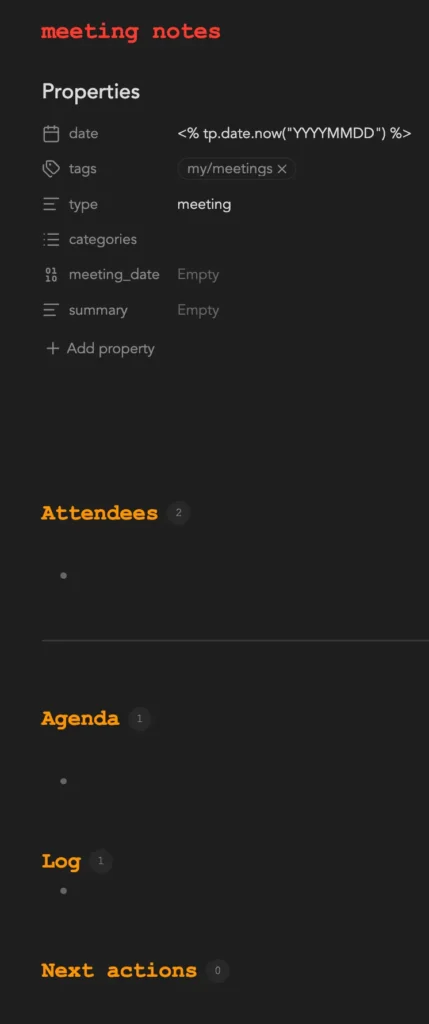
This is all great. But you have to keep in mind that this is my thinking process.
This might not be exactly how your mind works.
If that’s the case, adopting this workflow in whole would eventually create some mental friction.
So the best way to find your perfect system is to watch yourself working towards a solution like this.
Once you solve one problem with a workflow that fits the way you think, the next problem—or the corresponding workflow—will come together much more quickly because you already have an idea of how you want to make it work.
Workflow first, folders second
One of the best things about Obsidian for me is the folder system. I get to create folders as I would on a regular computer, which is not something every note-taking app offers.
That said, meddling with folders would not be the best place to start when creating a good working system inside Obsidian.
The ability to create folders is great, yes, but they should emerge organically.
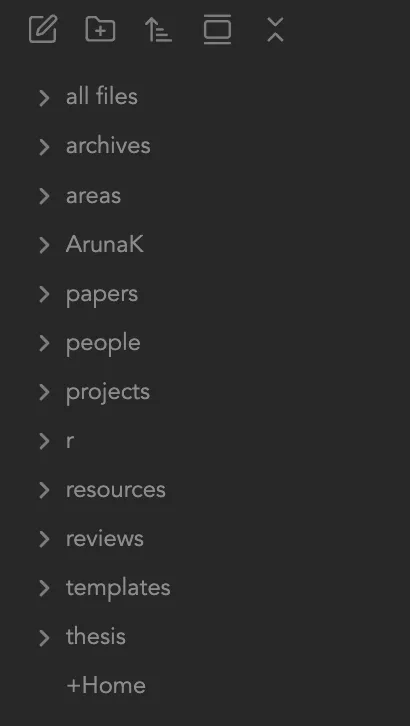
For example, I remember starting out with a folder system called PARA: Projects, Areas, Resources, and Archives.
Though I still use a fraction of this system, a different folder structure has evolved on its own as my workflows have evolved.
The more I work in Obsidian, the clearer it becomes to me that this is a one-way street.
Workflows should come first, following the path of least resistance. The duty of the folders is to further reduce the friction in that workflow.
For example, I realized during my PhD that my research workflow was made up of a combination of projects, areas, and resources. I needed a higher-level folder for all of this, so I created one specifically for research and simply called it r.
Conclusion
All in all, the basis behind an Obsidian vault that works for you is that it’s designed around solving problems, not for the sake of making it look good.
The most sensible way to build one, then, is to start with just one problem that you’re trying to solve, one that you need an immediate solution for.
Once a workflow is created, creating the next workflow will be exponentially easier.
Do this a few more times to solve a few more problems, and you’ll have a real, functioning, evolving Obsidian vault, a one you can call a “second brain.”